How I Would Spend One Hour Improving an Existing Blog Post
Use Google Search Console and AI to refresh an existing article, answer overlooked questions, and add relevant internal links in a focused one-hour workflow.
An SEO content refresh does not have to turn into a monthlong project.
Sometimes an existing article already answers most of the right questions. It just misses a practical detail, leaves an important concern unresolved, or fails to connect readers with the next useful page.
That is where I would spend an hour.
The goal is to improve one article deliberately. I would use Google Search Console to identify opportunities, AI to help organize them, and my own judgment to decide what belongs on the page.
Here is the workflow I would use.
Minutes 0–10: Pick a page worth improving
Start with an article that already attracts relevant search impressions and has a clear connection to your business.
It does not need to be your most popular page. A moderately successful article that brings in potential customers may deserve attention before a high-traffic post with little commercial relevance.
In Search Console's search performance report, select the page and apply its URL filter. Then review its queries and export the data. Confirm the filter is active before exporting. [3]
I would usually start with a few months of data, then adjust for seasonality or a recent website change.
Minutes 10–20: Look for unanswered questions
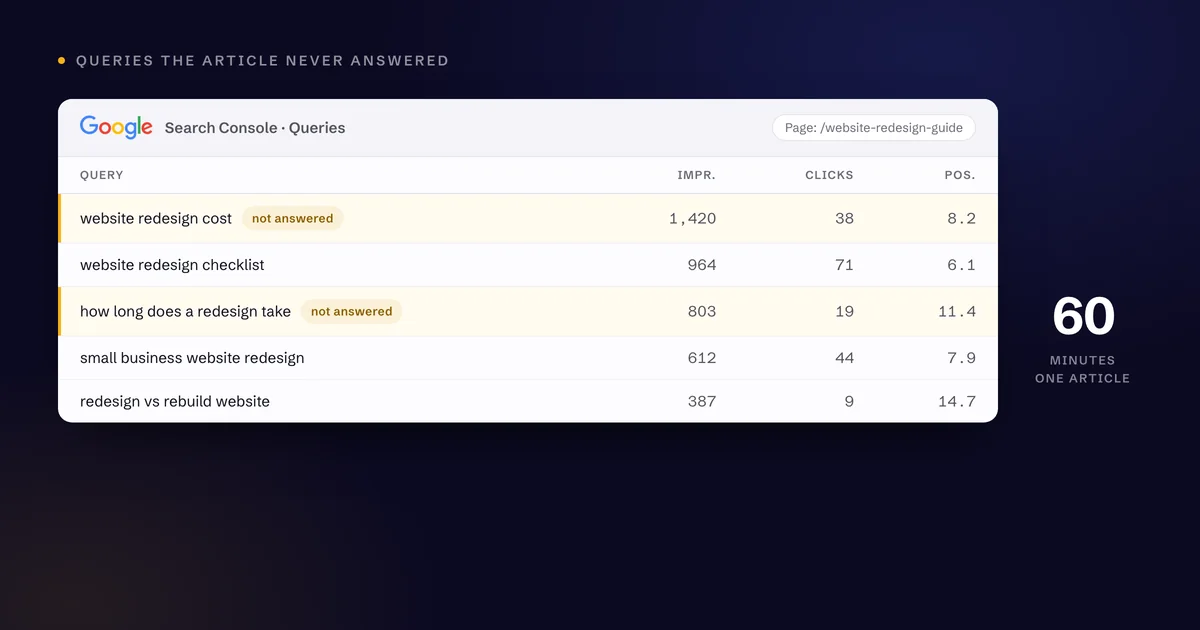
Compare the queries with the article.
Are people finding a website redesign article through searches about cost, while the article never discusses budget? Are timeline searches appearing even though the page gives no sense of the project stages?
Those are useful clues.
A query with impressions is not automatically a section you should add. It may reflect an ambiguous phrase or an audience you do not serve.
Group related questions, then select one or two that improve the article for the intended reader. Check the current results manually when the search intent is unclear.
Do not turn a focused article into a collection of everything remotely related to the topic.
Minutes 20–35: Use AI for a first pass
Give your chosen AI tool the article and query export. Remove anything sensitive before uploading.
My prompt would be:
Compare this article with its Search Console queries. Identify up to three relevant questions the article does not answer well. Suggest where each answer belongs. Do not invent data, customer examples, results, or services. Flag questions that should become a separate page.
Review those suggestions before requesting new copy.
Then ask for one section at a time, with a specific purpose and a rough length. For example: explain what affects a redesign timeline in 120 words.
That is easier to review than a complete rewrite that quietly changes your argument, repeats existing sections, or adds claims you would never make.
Minutes 35–45: Edit like your name is on it
Because it is.
Read the new section aloud. Replace generic wording with a direct explanation. Cut the opening sentence if it takes too long to get to the point.
Verify technical claims and remove invented certainty. "This will increase conversions" needs evidence. "This gives visitors a clearer next step" may accurately describe the change.
I want confident writing, but confidence should come from being specific.
Add a useful example if you can support it. Label hypothetical examples clearly. Never let the AI create a client success story just because the paragraph sounds stronger with one.
Minutes 45–55: Connect the next useful page
Look for a relevant internal link.
An article about planning a redesign might naturally point to your redesign service or a guide to preparing website content. This is internal linking for SEO doing its ordinary job.
The destination can be an underperforming page, but it still needs to deserve the visit. Check its content and next step before adding the link.
Do not invent a new section solely to connect two unrelated subjects. If the link needs that much explanation, choose another destination.
Also reread the opening. It may need a small adjustment so it accurately introduces the improved article.
Minutes 55–60: Publish and document the change
Keep the original publication date. If the revision is substantive, display an honest updated date and align the page's dateModified data with it. Google's date guidance distinguishes publication from significant updates. [4]
Check the live page, links, mobile layout, and metadata. You can use URL Inspection to request indexing, but the request does not promise timing or rankings.
Record what changed and review performance after enough data accumulates. Track relevant queries and inquiries, not just total clicks.
An hour is a useful boundary for a small refresh. If the page needs deeper research or a rebuild, give it the time it needs — and fold it into a business-focused SEO plan rather than treating it as a one-off.
Want help choosing the right page? Start with the article closest to a customer question your website still leaves unanswered.
Sources for this article
Want a second set of eyes on your website? Let's look at the gaps between getting discovered and earning the inquiry.
Start a conversationGet these by email
One practical piece on SEO, AI search, and the websites that have to carry the work. No roundups, no filler.
Form not showing up? A tracker blocker is the usual cause.